Find a date
Suggest dates, see who is free and choose what works best.
Get started
- Add a title and the dates and times you are considering. Check the time zone.
- Choose whether names and notes will be visible to others.
- Create the date poll and share its link. Keep your private Manage link to yourself.
- Check the responses and select the date that works best for your group.
Compare the answers
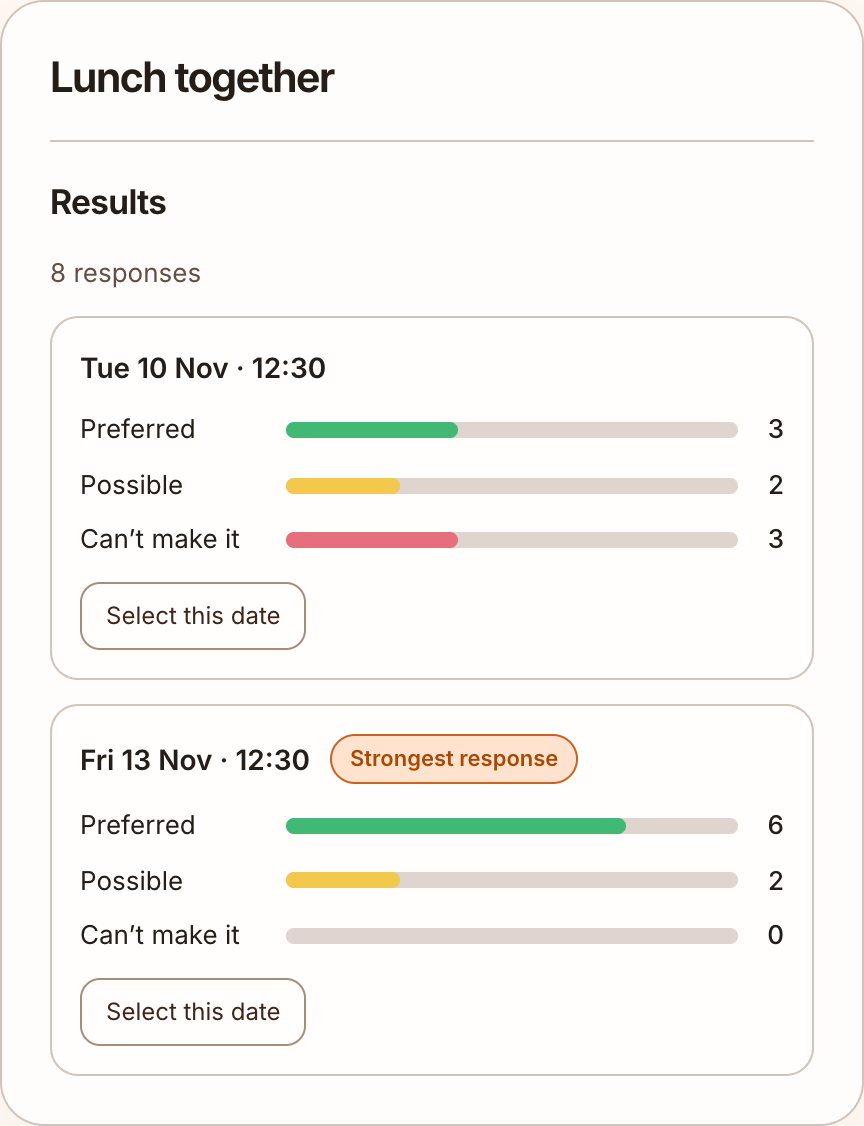
People mark each date Preferred, Possible or Can’t make it. They can also add a note.
Strongest response highlights the date with the strongest support in the answers so far. It helps you compare the dates; you still choose the final date.
Tell the group
Share your chosen date with the group. Selecting a date closes the poll to further answers.
Messages already copied into chat do not update automatically. Share the date-poll link so people can see the latest information.
Change dates or privacy settings
Choose the name and note visibility settings before sharing. You cannot change them after the first response.
If you change the proposed dates after people have answered, check the affected answers before choosing a date.
Taking part
Open the link, enter your details and mark your availability for each date. Save your answers.
To change them while the poll is open, return in the same browser or recover your response using the email you entered before.